 WiseCord
What Is Discord Server Monitoring? A Plain Guide

Part of the Discord tracker guide
This article is one chapter. The full picture, with the product walkthrough and the comparison table, is on the Discord tracker page.
Discord server monitoring is the ongoing practice of tracking activity inside a Discord server so you know who is joining, when your community is most active, and how it changes over time. Instead of manually scrolling the member list or hoping you catch important moments, monitoring turns that raw activity into alerts and exportable records. It matters most to community managers, paid-community operators, and marketers who need to react quickly and keep accurate records.
What Discord server monitoring actually means
At its core, monitoring answers three questions that Discord's own interface makes surprisingly hard to answer: who is in my server, who just arrived, and what is happening while I'm away? Discord shows you a live member sidebar and sends basic notifications, but it doesn't keep a history, it doesn't tell you the moment a specific person joins, and it certainly doesn't hand you a spreadsheet you can filter and analyze.
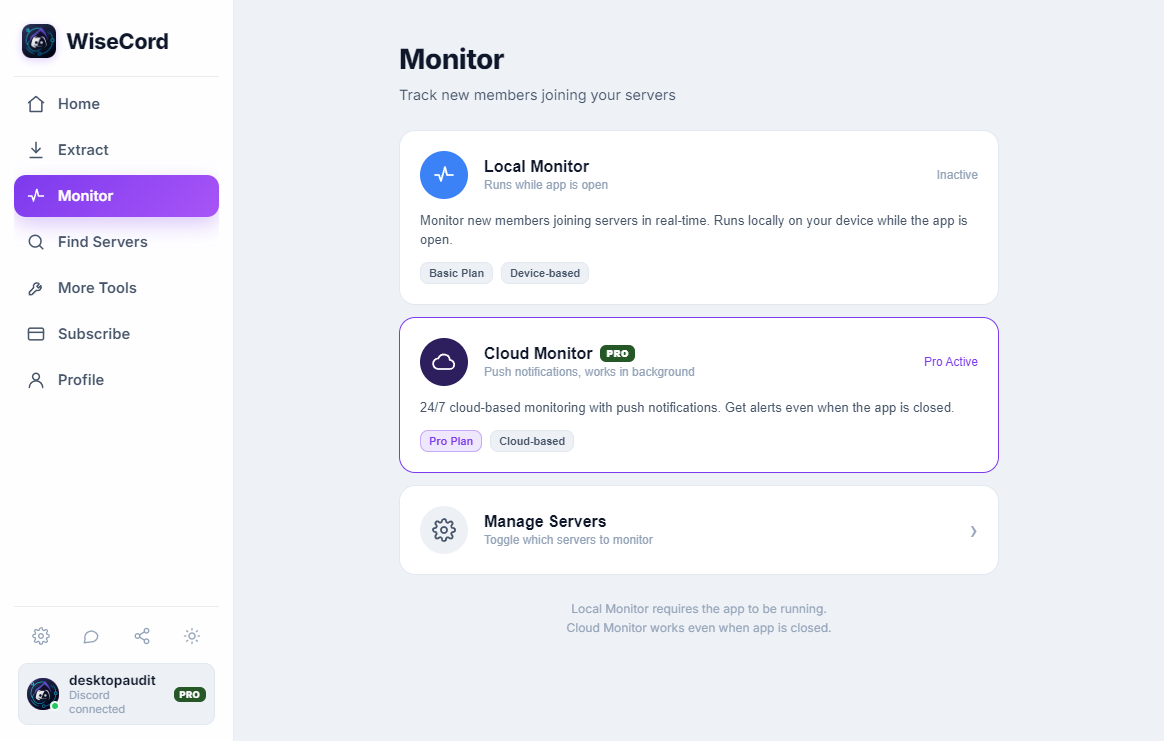
Monitoring fills those gaps. A good monitoring setup captures member joins as they happen, records details you'd otherwise have to copy by hand, and keeps working in the background. The goal isn't surveillance for its own sake — it's operational awareness. If you run a trading-signals server, a coaching community, or a customer support hub, you're accountable for what happens there, and monitoring is how you stay accountable without living inside the app.
Why community operators monitor their servers
Different people monitor for different reasons, but the underlying motivation is the same: Discord moves fast, and important events are easy to miss. Here are the most common drivers:
- Catching new members immediately: For paid or invite-based communities, knowing the instant someone joins lets you welcome, verify, or onboard them before they lose interest.
- Keeping records: A live sidebar disappears when you close the app. An exported member list is a durable record you can revisit, filter, and reconcile against your payment platform or CRM.
- Understanding rhythm: Knowing when joins cluster — after a promotion, a livestream, or a partner shout-out — tells you what's actually driving growth.
- Reducing manual work: Checking multiple servers by hand is tedious and error-prone. Automation frees you to focus on the community itself.
If you're weighing whether this is worth the effort, our guide on how to track Discord server activity walks through the day-to-day payoff in more detail.
What you can realistically monitor — and what you can't
Honesty matters here, because the biggest source of frustration is expecting monitoring to see things it can't. A monitoring tool works through your own Discord account, which means it can only observe what your account can already see. That has real consequences:
- You see the members Discord shows you. In large servers, Discord doesn't load the entire member list at once — it prioritizes online and recently active users. So an extract reflects who's currently visible to your account, not necessarily every account that has ever joined.
- Bigger servers take longer. Reading a large member list responsibly means going slowly. Good tools deliberately rate-limit themselves so your account behaves like a normal client rather than hammering Discord.
- Permissions still apply. If a channel or member list is hidden from your role, monitoring can't reveal it. You're not bypassing Discord — you're organizing what you already have access to.
Understanding these boundaries up front sets realistic expectations and keeps your usage well within normal client behavior.
Approaches to Discord server monitoring compared
There's no single "right" way to monitor a server — it depends on whether you own the server, how technical you are, and what device you're on. Here's an honest comparison of the main approaches:
| Approach | Best for | Strengths | Limitations |
|---|---|---|---|
| Manual checking | Tiny servers, occasional glances | Free, no setup, no tools | No history, misses events, impossible to scale across servers |
| Discord bots | Servers you own or admin | Official API, logs joins/leaves, welcome messages | Requires admin rights to add; can't monitor servers you don't control |
| Browser extensions | Desktop-only power users | Convenient inside the web client | Desktop-bound; quality and safety vary widely; often abandoned |
| WiseCord (Android app) | Operators who want mobile join alerts and exports | Real-time join alerts, Excel/CSV export, multi-server tracking, optional 24/7 cloud monitoring, a deliberately unhurried pace | Android only; sees what your account sees; large servers extract more slowly |
Notice that bots and WiseCord aren't really competitors — they solve different problems. Bots are ideal for the servers you administer, while a tool like WiseCord is built for tracking joins and exporting members across servers from your phone. Many operators use both. For a broader look at the landscape, see our roundup of the best Discord monitoring tools.
How WiseCord approaches monitoring
WiseCord runs on Windows, macOS and Android built specifically for community operators who need monitoring on the go. Rather than trying to be everything, it focuses on the tasks operators repeat constantly:
- Real-time join alerts: Push notifications fire when someone joins a monitored server, so you can act while the moment is fresh. Setting these up is covered in our guide to Discord server alerts.
- Member export: Pull a server's visible member list into Excel (.xlsx) or CSV, including username, user ID, nickname, roles, join date, and account-creation date. There's also one-tap copying of usernames when you just need a quick list.
- Multi-server tracking: Watch several servers at once instead of switching between them manually.
- 24/7 cloud monitoring (Pro): Keep tracking joins even when the app is closed or your phone is off — the monitoring continues in the cloud. This is explained further in our cloud monitoring breakdown.
- Account safety by design: a deliberately unhurried pace keeps activity within normal client behavior rather than pushing against Discord's limits.
You can see the full feature set on the features page, and WiseCord is available as a direct download rather than through the Play Store.
Practical tips for effective monitoring
Monitoring is only as useful as the habits around it. A few practices consistently separate operators who get value from those who don't:
- Alert on what you'll actually act on. If every join pings you, you'll start ignoring notifications. Reserve real-time alerts for the servers where a fast response matters — your paid community, not every server you've lurked in.
- Export on a schedule, not just once. A single snapshot ages quickly. Exporting your member list regularly gives you a series you can compare, which is far more revealing than any single file.
- Re-run large extracts. Because big servers surface online and recent members first, running an extract at different times captures a wider slice of the community over the course of a week.
- Reconcile against your source of truth. If you run a paid community, compare exported members against your payment or CRM records to spot people who joined Discord but never subscribed — or vice versa.
- Let the rate limiting do its job. Don't try to rush extraction on large servers. The deliberate pacing exists to keep your account safe; patience is the safer trade.
Who benefits most from server monitoring
Monitoring isn't just for large operations. It tends to pay off wherever a community has real stakes attached:
- Paid-community operators running crypto, trading, sports-picks, coaching, or forex servers, where a new join may be a new subscriber to welcome or verify.
- Community managers who need to demonstrate growth and engagement to stakeholders and want durable records rather than screenshots.
- Marketers gauging which promotions and partnerships actually drive members through the door.
If you're juggling several communities at once, our guide on how to monitor multiple Discord servers covers workflows for keeping them all straight.
Frequently asked questions
Will monitoring get my Discord account banned?
The risk comes from tools that behave abnormally — hammering Discord with rapid requests. WiseCord is designed to work within normal client behavior and includes a deliberately unhurried pace, which is why large servers extract more slowly. There's no way to promise any third-party tool is risk-free, but staying within ordinary usage patterns and not rushing extractions is the safest approach.
What data does a member export include?
A WiseCord export contains the fields visible to your account: username, user ID, nickname, roles, join date, and account-creation date. You can save it as Excel (.xlsx) or CSV, or copy usernames with one tap. Remember that it reflects the members Discord currently shows your account, which in large servers skews toward online and recently active users.
Do I need to own or admin a server to monitor it?
Not with an account-based tool like WiseCord — it works through your own account and sees what you can already see, so admin rights aren't required. If you do own the server, an official Discord bot is a great complement for logging joins and leaves directly. The two approaches work well together.
What's the difference between the free trial and Pro?
Core monitoring and export features let you get started, and every plan includes a free trial. The Pro tier adds 24/7 cloud monitoring — tracking joins even when the app is closed or your phone is off — along with message search. You can compare the Basic and Pro options on the pricing page.
Is WiseCord available on iPhone?
WiseCord runs on Windows, macOS and Android and is distributed as a direct download rather than through the Play Store; the download page links a VirusTotal scan for transparency. There is no iOS version at this time, so an Android device is required to use it.
Is monitoring the same as spying on members?
No. Monitoring organizes information your account can already access — member lists and join events — into records and alerts. It doesn't reveal private messages, hidden channels, or anything your permissions don't already grant. Think of it as record-keeping and situational awareness for the communities you're part of, not surveillance.
Getting started
If you're ready to move from manual checking to real monitoring, the path is short: download WiseCord, choose the servers you care about, set alerts on the ones that matter, and run your first member export. From there, monitoring becomes a background habit rather than a chore — and you'll stop missing the moments that matter in your community. To understand the full workflow before you dive in, our how it works overview lays out each step.
Related reading: getting the most from real-time alerts, how you know when someone joins a server, and monitoring voice activity.